CNC Machining Design Mistakes That Increase Cost
Small CNC design decisions can significantly impact machining cost, lead time, and manufacturability. Features such as deep cavities, unnecessary tight tolerances, thin walls, and non-standard holes often increase setup complexity and machining time without improving part performance. In this guide, we cover the most common CNC machining design mistakes and explain how to reduce manufacturing cost while improving machinability and production efficiency.
Why CNC Machining Design Mistakes Increase Manufacturing Cost
Poor CNC machining design decisions can significantly increase manufacturing cost by adding extra setups, tool changes, and longer machining cycles. Features such as deep cavities, tight tolerances, and complex geometries may require slower cutting speeds, specialised tooling, or advanced 5-axis machining. Complex parts also increase fixturing and inspection time while raising the risk of machining errors and scrap. Designing parts with manufacturability in mind helps reduce machining time, improve production efficiency, and lower overall CNC machining costs.
| CNC Machining Design Mistake | Manufacturing Impact |
|---|---|
| Tight tolerances | Higher machining time and inspection cost |
| Deep cavities | Tool deflection and slower cutting speeds |
| Thin walls | Vibration, warping, and part instability |
| Non-standard hole sizes | Longer setup time and extra tooling |
| Sharp internal corners | Smaller tools and increased tool wear |
| Complex geometries | Higher 5-axis machining costs |
| Multiple machining setups | Increased setup time and alignment risk |
| Poor tool access | Longer cycle times and vibration issues |
| Deep threads | Unnecessary machining time |
| Unnecessary surface finishing | Higher production and polishing costs |
Avoid Multiple CNC Machining Setups
Every time a CNC part needs to be repositioned or re-fixtured, machining costs increase. Multiple setups add extra machine preparation time and increase the risk of tolerance stack-up, where small dimensional variations accumulate across operations. Complex setups also slow production and raise the chances of alignment errors or rejected parts. Designing parts that can be machined in fewer setups helps improve accuracy, reduce lead times, and lower overall CNC machining costs.
Design Parts for Standard Tool Access
Poor tool access is a common CNC machining design mistake that increases cycle time and tooling costs. Deep pockets, narrow cavities, and hard-to-reach features often require long cutting tools, which are more prone to vibration and tool deflection. Difficult access paths also force machinists to reduce cutting speeds, slowing the entire machining process. Designing parts with clear and accessible tool paths improves machining efficiency and reduces CNC production costs.
Avoid Unnecessary 5-Axis CNC Machining
5-axis CNC machining is ideal for producing highly complex geometries, undercuts, and multi-surface components. However, it significantly increases CNC machining costs due to longer programming time, advanced CAM setup, specialised fixturing, and extended machine runtime.
In many CNC manufacturing projects, parts are unnecessarily designed for 5-axis machining when they could be optimised for more cost-effective 3-axis CNC milling. By simplifying geometry early in the design stage, engineers can significantly reduce CNC machining costs, lead times, and production complexity.
When possible, redesigning features such as angled cuts, deep pockets, or complex contours can allow the use of standard 3-axis machining processes, which are more widely available and cost-efficient.
Why These CNC Design Mistakes Increase Manufacturing Cost
Avoid Non-machinable Features
While CNC machining can produce highly complex geometries, certain features simply cannot be machined using conventional CNC machining. These features include:
- Undercuts: Undercuts are sections that require material removal from underneath overhanging structures. Some undercuts can be machined using complex, specialised tools and multi-axis machining.
- Complex internal channels: Machining tools are typically cylindrical and follow straight paths. Some internal channels, such as curved holes and helical channels, do not present compatible access paths for the tool. As a result, the CNC milling process cannot create such channels. Advanced techniques such as EDM (Electrical Discharge Machining) are more appropriate for these features.
- Complex internal cavities: Like internal channels, machining complex internal cavities geometries, like hollow spheres or intricate internal lattices, is impossible with conventional CNC, as the tools cannot navigate within a fully enclosed internal space.
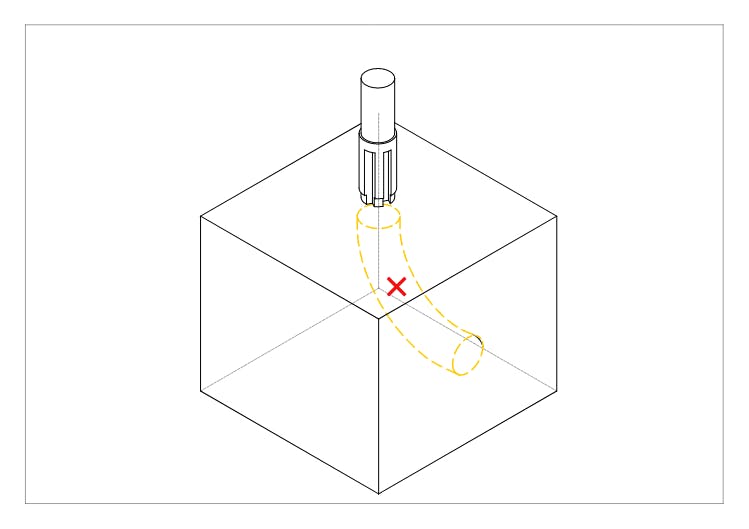
CNC design mistakes: Complex internal channels
See our CNC machine design guide to learn more about designing for CNC machining.
Prioritise Functionality and Manufacturability in CNC Design
A core principle in CNC design is to prioritise manufacturability alongside functional requirements. Overly complex features often lead to increased production difficulty and require advanced manufacturing methods such as 5-axis machining or Electrical Discharge Machining (EDM), which increase both cost and lead time.
To improve CNC design for manufacturability, designers should evaluate each feature based on how it will be produced, what tooling is required, and whether simpler geometry can achieve the same function. This approach is widely used in Design for Manufacturability (DFM) practices.
Focusing on manufacturable CNC design not only reduces machining complexity but also improves production scalability, consistency, and overall part cost—without compromising structural integrity or performance.
Limit the Use of Tight Tolerances
CNC machining is highly accurate and can achieve tight tolerances. However, in many instances, applying tolerance to all the dimensions in your design is unnecessary. Improve CNC design by only specifying tolerance when it is crucial for the part's functionality, such as mating or moving parts. CNC machining operations, such as CNC milling and CNC turning, typically apply a default tolerance of ± 0.13 mm, which is quite accurate. Tighter tolerances are achievable but require more time and effort. See our guide on CNC machining tolerances for more information on tolerancing.
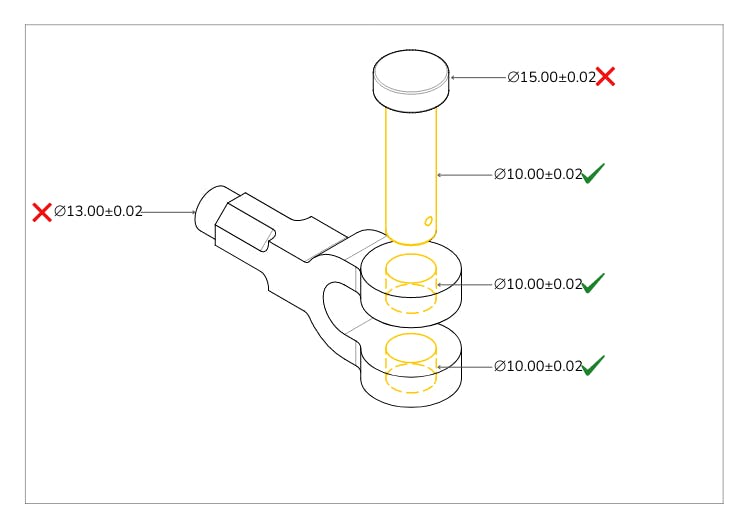
CNC design mistakes: Over tolerancing
Minimise Aesthetic Features
Improve your design by minimising aesthetic features. Considering the capabilities of CNC machining services, it may be tempting to get carried away with decorative patterns, embossments, engravings, lettering, and other aesthetic features. However, features that have no functionality and only serve to improve aesthetics unnecessarily increase machining time and effort, and including them is a major CNC design mistake. On the other hand, if aesthetics is a major consideration for your part, then feel free to include such features.
Overcomplicating Designs with Unnecessary Features
Adding unnecessary features, like intricate details or overly complex shapes, can drive up machining costs. These extra features take more time to machine and may require expensive tools or special techniques. To keep costs down, focus on simple, functional designs that do the job without added complexity. Keeping things straightforward not only saves money but also speeds up the manufacturing process.
Design Sufficiently Thick Walls
During machining, the workpiece is subject to continuous vibration on contact with the cutting tool. Similarly, the tool or workpiece may bend or deflect slightly. Thinner walls are less stiff and more susceptible to bending, breaking, and warping due to vibrations and deflections. Their susceptibility to vibrations also lowers achievable accuracies. Design sufficiently thick walls with enough stiffness to withstand vibration or tool deflection. We recommend a minimum wall thickness of 0.8 mm for metals and 0.15 mm for plastics.
Maintaining a good wall width-to-height ratio is also important, as taller walls are also more susceptible to damage and warping during machining. We recommend a width-to-height ratio of 3:1 for non-supported, free-standing walls to ensure stability.
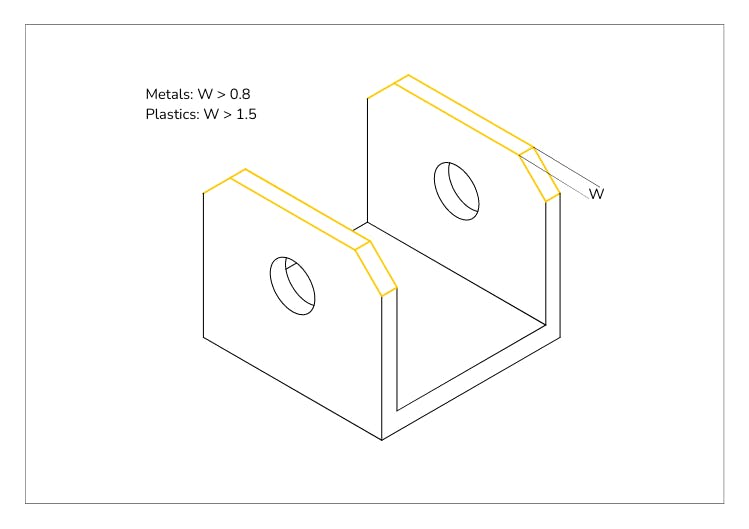
Improve CNC design: Sufficient wall thickness
Choosing Expensive Materials Without Consideration
Choosing expensive materials without considering how easy they are to machine can add unnecessary costs. Hard-to-machine materials, like high-strength alloys or exotic metals, may need special tools or slower cutting speeds, which means more time and higher costs. When designing for CNC machining, it’s important to pick a material that’s easy to machine while still doing the job. This simple choice can save a lot of money in the long run.
Assign Radii to Internal Edges
The cylindrical geometry of CNC milling cutting tools makes them unable to machine sharp internal edges. These tools produce a radial internal edge that is a minimum of the tools’ radii. Improve your CNC design by adding radii to internal edges. Another common CNC design mistake is adding an internal edge radius smaller than the tool’s radius. We recommend adding an internal radius 30% bigger than your cutting tool’s radius to mitigate tool wear and tear. For example, if your cutting tool is 10 mm, design internal edges with a 13 mm radius. This allowance reduces tool stress and increases cutting speed.
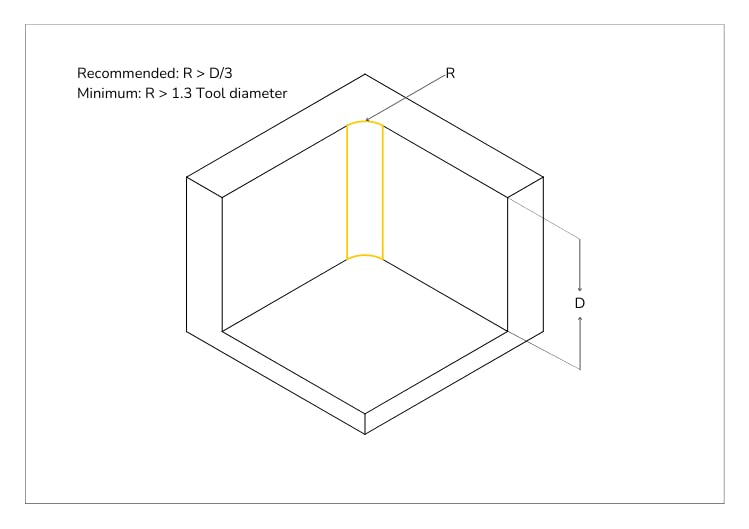
Improve CNC design: Assign Radii To Internal Edges
Use Standard Hole Sizes
Standard hole sizes can be efficiently and accurately drilled with readily available standard drill bits. Non-standard holes, on the other hand, require end mill tools to machine out the dimension progressively. This increases machining time and effort. Furthermore, for threaded holes, standard hole sizes have corresponding thread sizes programmed in CNC machines, making it more efficient to create threaded holes.
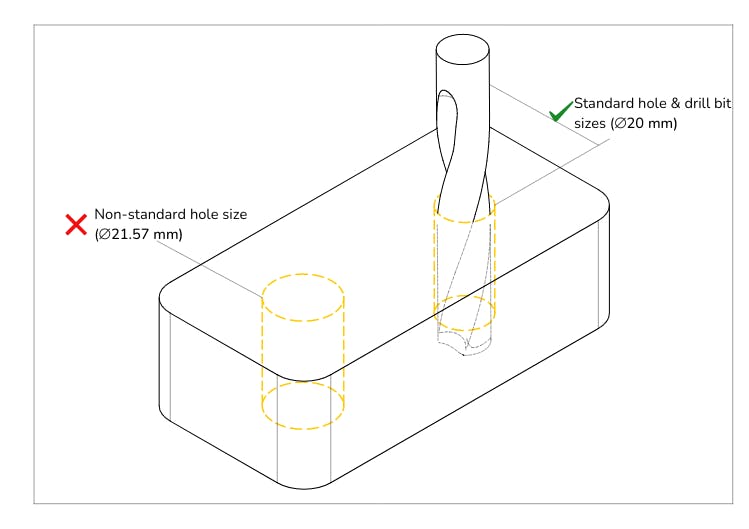
CNC design mistakes: Non-standard hole sizes
Limit Thread Depths
The strength of thread connections usually resides in the first few threads. Improve your CNC design by limiting the depths of your threads to a maximum of three times the hole diameter. For through holes, you can design threads at the top and bottom. For blind holes, we recommend leaving an unthreaded length of half the hole’s diameter at the bottom.
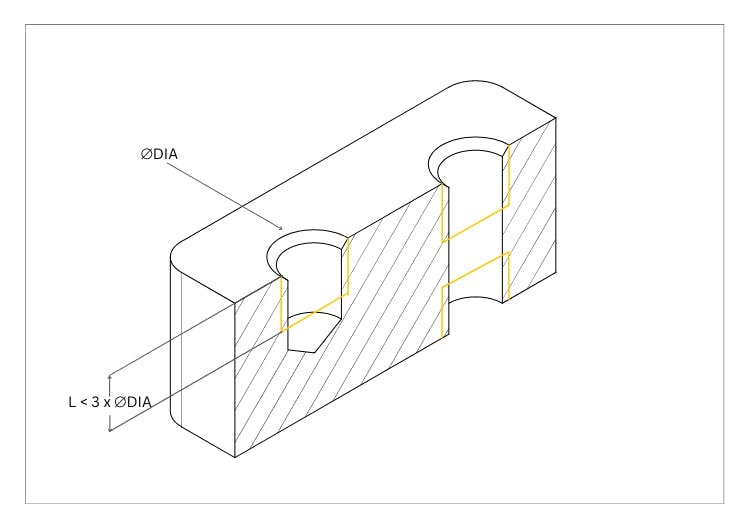
Improve CNC design: Limit thread depth
Limit Cavity Depth
CNC cutting tools have a limited depth, typically 3 to 4 times their diameter, beyond which they are highly susceptible to deflection and fracture. Design cavities with a suitable depth-to-width ratio to prevent tool hanging and deflection and to facilitate chip evacuation. Milling tools mill cavities three times their diameter in depth most efficiently. Cavities deeper than six times the tool diameter are considered deep. Such cavities should have a maximum depth of four times their width to allow for sufficient machining space.
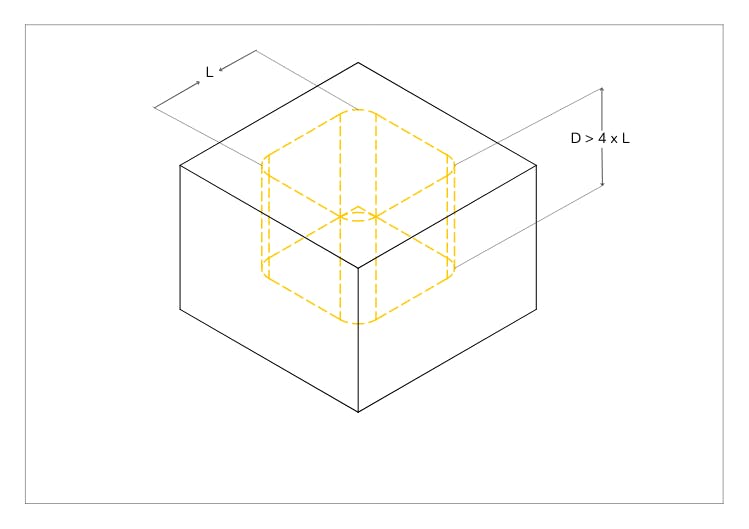
Improve CNC design: Limit cavity depth
Specify Standard Surface Roughness
CNC machines typically produce a default surface roughness of 3.2 µm Ra and can produce surfaces as smooth as 0.06 µm Ra. However, machining time and cost increase exponentially with specified surface roughness. We recommend specifying the default surface roughness of 3.2 µm Ra when surface roughness is not critical. Smooth surface roughness is crucial for functionality in certain applications, such as load-bearing and mating, moving parts. For example, Medical CNC machining applications, such as joint replacement parts where loading and movement are continual, require very low surface roughness. See our CNC machining surface roughness article to learn more about specifying the right surface roughness for your part.
Why Design for Manufacturability (DFM) Matters in CNC Machining
Many CNC machining costs are created long before production even starts. Design choices such as unnecessary tight tolerances, difficult tool access, deep cavities, and complex geometries can increase setup time, machining hours, tooling requirements, and inspection effort. In many cases, engineers focus heavily on part functionality without considering how those decisions affect manufacturability and production efficiency. Designing with DFM principles in mind helps reduce machining costs, improve quote accuracy, speed up lead times, and make parts easier and more reliable to manufacture at scale.
Conclusion
Good CNC machining design is not just about making parts manufacturable — it is about reducing machining costs, improving production efficiency, and avoiding unnecessary delays. Design decisions such as limiting tight tolerances, simplifying geometries, improving tool access, and reducing setups can significantly improve manufacturability while lowering cycle times and production costs. Optimizing your CNC designs also helps speed up quoting, reduce scrap risk, and achieve faster lead times.
At Geomiq, our instant quoting platform analyzes your CAD files in seconds and provides DFM feedback to help improve machining efficiency and reduce manufacturing costs. Upload your CNC design today to get a fast quote and receive high-quality parts in as little as three days.
Frequently Asked Questions
Why do CNC machining quotes vary so much?
What CNC features are most expensive to machine?
How do tight tolerances affect CNC machining cost?
Why are deep cavities difficult to machine?
When is 5-axis CNC machining necessary?
What wall thickness is recommended for CNC machining?
About the author
Sam Al-Mukhtar
Mechanical Engineer, Founder and CEO of Geomiq
Mechanical Engineer, Founder and CEO of Geomiq, an online manufacturing platform for CNC Machining, 3D Printing, Injection Moulding and Sheet Metal fabrication. Our mission is to automate custom manufacturing, to deliver industry-leading service levels that enable engineers to innovate faster.