Is it Hard to Learn CNC Machining? A Beginner’s Guide
Is CNC machining hard to learn? The basic concepts are approachable, but becoming confident with machine setup, programming, tooling and troubleshooting takes time and hands-on practice. The difficulty also depends on the role: operating a CNC machine is generally easier to learn than programming complex parts or engineering complete manufacturing processes.
In this guide, we explain what beginners need to learn, how long it can take, which skills matter most and the different routes into CNC machining, from self-study and simulators to formal training and hands-on practice.
What is CNC Machining?
CNC machining is a manufacturing process that uses pre-programmed software to control the movement of tools and machines. CNC machines are capable of performing tasks like drilling, CNC milling, turning and more with high precision. This technology is essential in industries that require extremely tight tolerances and consistent results, such as aerospace and medical device manufacturing.
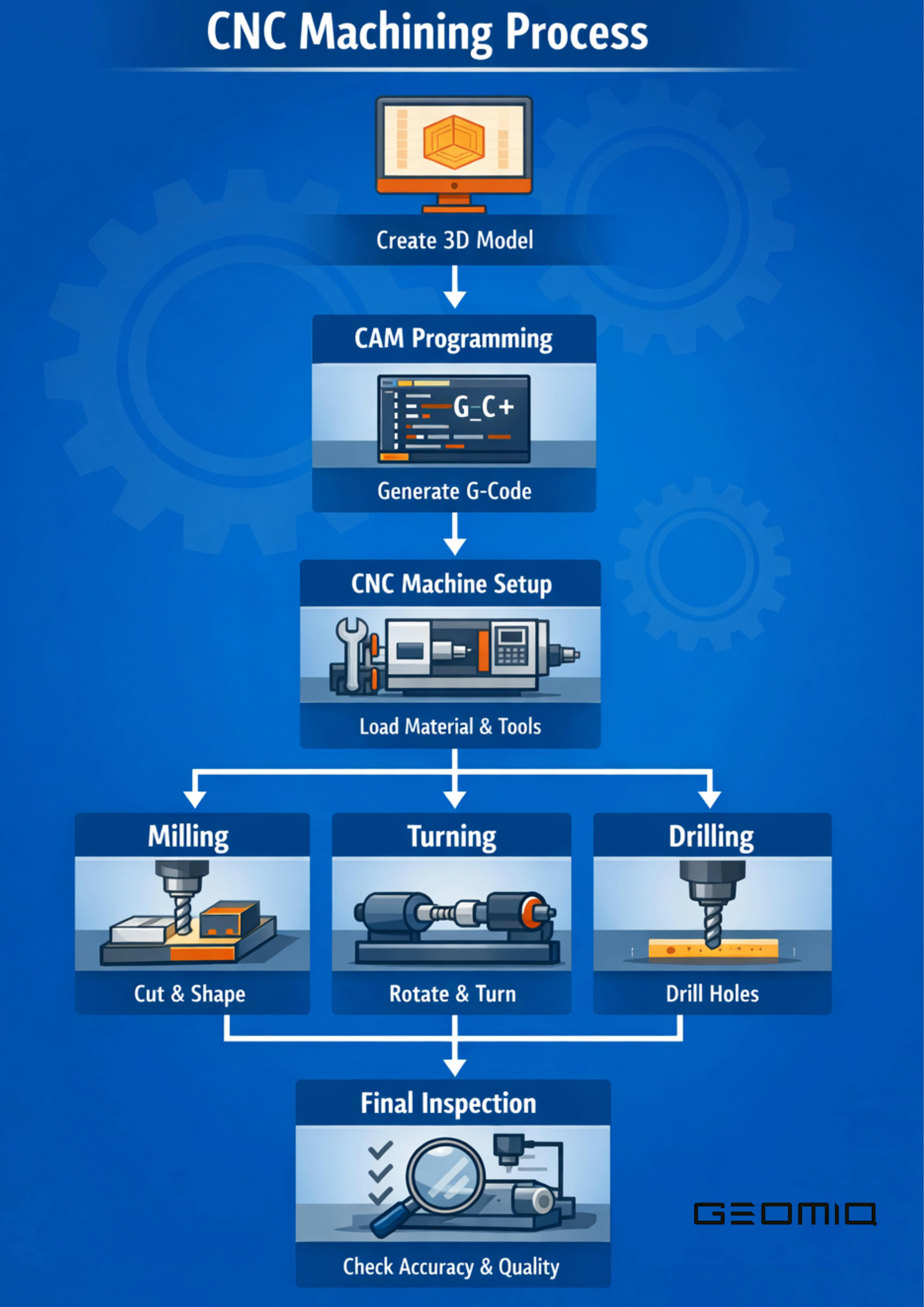
To better understand the CNC machining process, here's a flowchart that outlines each key step, from creating a 3D model to performing tasks like drilling, milling and turning with high precision.
What CNC Machining is Used For
CNC machining is used to create parts across various industries, including aerospace (precision components like turbine blades), medical devices (surgical tools and implants), automotive (engine components, chassis) and consumer electronics (casings for smartphones and other devices).
Difference Between CNC Machining and Manual Machining
Manual machining involves using hand-operated tools to form a piece of material. It requires significant skill and is often slower and less precise than CNC machining. CNC machines automate programmed machine movements, allowing cutting, drilling and milling operations to be carried out consistently while still requiring setup, tooling, monitoring and inspection. This makes CNC machining a key technology in rapid manufacturing, enabling faster production times and more accurate products.
To help you better understand the key differences, here's a comparison table that highlights the contrasts between CNC machining and manual machining in terms of precision, speed, automation and more.
| Feature | CNC Machining | Manual Machining |
|---|---|---|
| Precision | High repeatability and precision, depending on the machine, process, setup and part requirements | Depends on operator skill, lower repeatability |
| Speed | Fast and efficient, automated process | Slower, time-consuming due to manual adjustments |
| Automation | Automated machine movements based on programmed instructions | Operated manually, requires constant human control |
| Complexity of Parts | Capable of making complex, intricate parts | Best for simple parts with basic shapes |
| Setup Time | Initial setup can be time-consuming, but once set, efficient | Setup time varies based on the complexity of the task |
| Human Intervention | Requires setup, tooling, programme verification, monitoring and inspection | High, operator handles most of the machining process |
| Material Variety | Can handle a wide range of materials and part designs | Limited to specific materials and simpler designs |
| Cost | Higher initial equipment cost, but can become more cost-effective at higher production volumes. | Lower setup cost, but more expensive in large volumes |
How Hard is it to Learn CNC Machining?
How difficult CNC machining is to learn depends on the level you want to reach. Basic machine operation is generally easier to learn, while setup, programming, troubleshooting and advanced machining require more time, technical knowledge and hands-on experience. The learning curve also varies by role.
Learning CNC as an Operator
Becoming a CNC operator involves setting up, running and overseeing CNC machines. Operators must understand machine setups, adjust tool paths and monitor operations for efficiency. For beginners, this role is relatively easier to step into but still requires solid knowledge of machine operation and fixing issues.
Learning CNC as a Programmer
CNC programmers create the code that tells the machine what to do. This involves understanding G-code and how to translate CAD files into machine-readable instructions. Programming CNC machines is more difficult and requires understanding both the technical and logical aspects of the process.
Learning CNC as a Manufacturing Engineer
Manufacturing engineers design and optimise processes for CNC machines. This involves high-level understanding of both machining and materials science, as well as the ability to integrate CNC machining into broader manufacturing systems.
For beginners, the main challenge is not understanding what a CNC machine does, but building confidence with setup, programming and problem-solving through practice. More advanced roles naturally require deeper technical knowledge and experience.
How Long Does It Take to Learn CNC Machining?
The time it takes to learn CNC machining depends on the role, training method, access to equipment and amount of hands-on practice. As a general progression:
- Basic machine operation can be learned relatively quickly with structured training and supervised practice.
- Programming and setup skills usually take longer because they require experience with tooling, offsets, G-code or CAM and problem-solving.
- Advanced multi-axis machining requires deeper process knowledge and significantly more practical experience.
Common Misconceptions about Learning CNC Machining
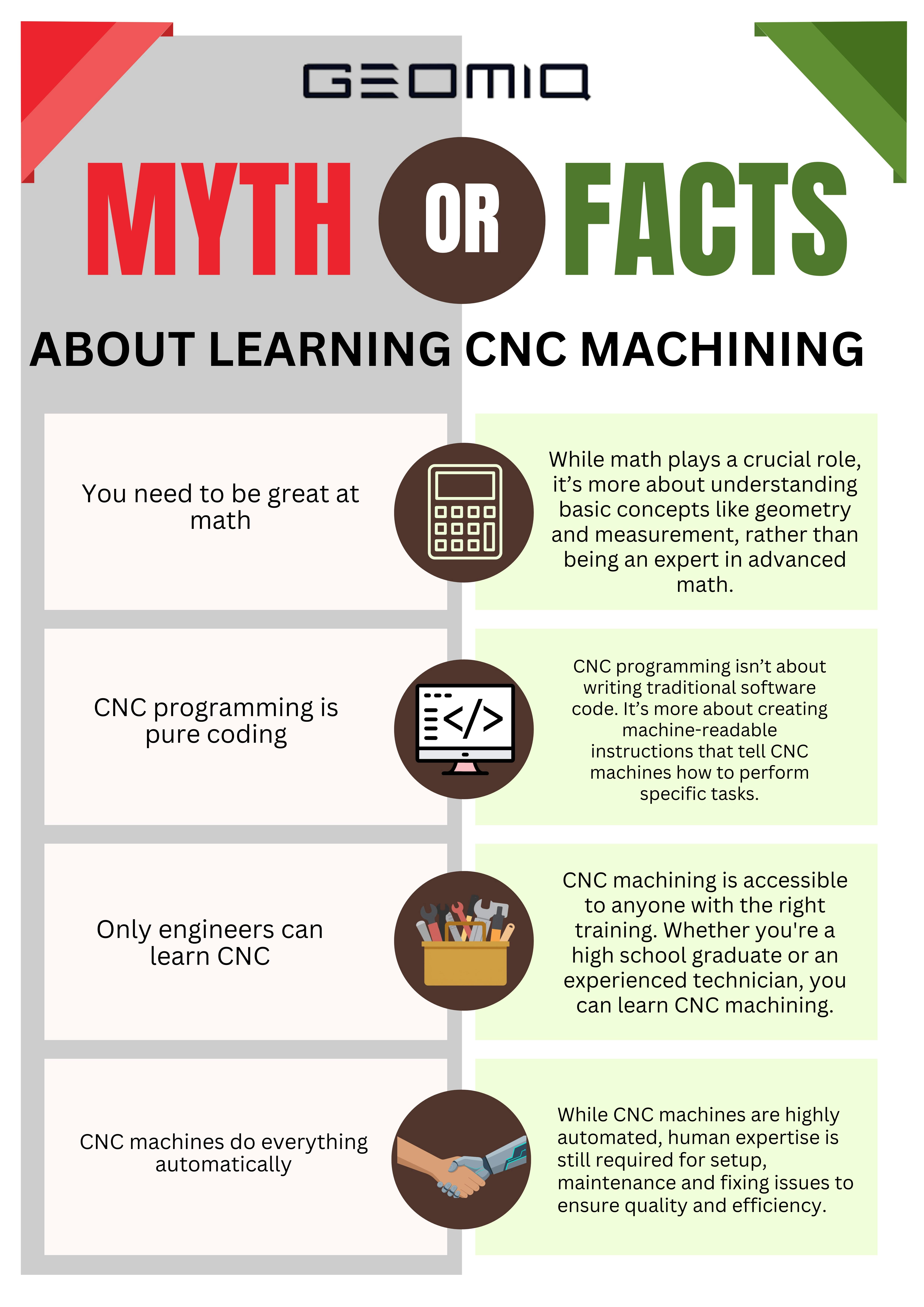
Many beginners have misconceptions about CNC machining that can create unnecessary barriers. To help clarify these misunderstandings, we've created a myth-fact infographic that breaks down some of the most common myths and the truths behind them.
What Skills Do You Need to Learn CNC Machining?
Beginners do not need to master every CNC skill at once. A strong foundation starts with understanding how CNC machines work, basic setup and safety, reading dimensions and coordinates, and gradually building knowledge of G-code, CAM software, tooling and troubleshooting. The skills you need will also depend on whether you want to become an operator, machinist or programmer.
Understand CNC Machine Types and Basic Operations
A good starting point is understanding the main CNC machine types and how they remove material. Milling, turning and multi-axis machines use different movements and tooling, so knowing the basic differences helps beginners understand which processes are suited to different part geometries and machining tasks.
| Machine Type | CNC Machining | Typical Applications |
|---|---|---|
| Milling | CNC milling machines use rotary cutters to remove material from a workpiece. They are versatile and can handle a variety of tasks, such as drilling and shaping. | Engine components, housing, intricate parts like brackets or gears. |
| Turning | CNC turning machines rotate the workpiece against a cutting tool. The tool removes material to create cylindrical parts. | Shafts, pins, bushings, and other cylindrical parts. |
| Multi-axis | Multi-axis CNC machines operate with more than three axes, allowing for complex, highly detailed cuts. They can move in more than one direction simultaneously. | Complex aerospace parts, medical implants, moulds for production. |
Learn the Basics of G-Code and CAM
Beginners do not need to become advanced CNC programmers immediately, but understanding the basics of G-code and CAM is important. G-code controls machine movements and machining commands, while CAM software helps generate toolpaths and machine code from CAD models. Learning how the two work together makes it easier to understand the complete CNC programming workflow.
Manual G-Code Programming
Manual G-code programming is still a valuable skill for CNC machinists. It’s not as commonly used in modern shops due to the rise of CAM, but learning G-code gives beginners a strong foundation in understanding machine movements and operations.
CAM Programming
CAM software uses CAD geometry to create machining toolpaths, which can then be post-processed into machine-specific G-code. This makes programming more efficient while still requiring an understanding of machining strategy, tooling and machine setup.
Do You Need Maths to Learn CNC Machining?
You do not need advanced maths to start learning CNC machining. Basic arithmetic, geometry and an understanding of coordinates are useful for reading dimensions, checking measurements and working with feeds and speeds. As you progress, problem-solving and analytical thinking become just as important, especially when diagnosing setup, tooling or machining issues.
How to Learn CNC Machining Step by Step
Learning CNC machining is easier when you build skills in a logical order. Beginners should start with the fundamentals before moving into programming, setup and more advanced machining tasks.
1. Learn the basics of CNC machining and machine safety
Understand how CNC machines work, the main machine types and the basic safety principles used in a machining environment.
2. Learn drawings, dimensions and coordinates
Build confidence reading basic technical drawings, measurements and coordinate systems used to position tools and workpieces.
3. Understand machine setup
Learn the basics of workholding, tooling, offsets and how a CNC machine is prepared before a job runs.
4. Learn basic G-code and CAM concepts
Understand how G-code controls machine movements and how CAM software converts CAD models into toolpaths and machine instructions.
5. Practise with simulations
Use CNC or CAM simulators to understand toolpaths and programming logic before working on a real machine.
6. Gain supervised hands-on experience
Apply the theory on real machines, where you can learn setup, inspection and safe machine operation in practice.
7. Build troubleshooting skills through experience
As you progress, learn how to identify issues related to tooling, setup, programming, material behaviour and part quality.
Ways to Learn CNC Machining
There is no single route into CNC machining. Beginners can build their skills through self-study, formal training or hands-on learning in a manufacturing environment, and many people combine more than one approach.
- Self-study – Books, online courses, tutorials and simulators can help beginners build theoretical knowledge and practise basic CNC concepts at their own pace.
- Formal training – Technical schools, vocational programmes and apprenticeships provide more structured learning and often include supervised practical experience.
- On-the-job learning – Entry-level manufacturing roles can provide direct exposure to CNC machines, setup, inspection and real production challenges under experienced supervision.
DIY Learning vs Formal CNC Training
Both self-directed learning and formal CNC training can be useful, depending on your goals, access to equipment and preferred learning style. Self-study offers flexibility and can build a strong theoretical foundation, while formal training usually provides more structure and easier access to supervised hands-on practice. Many beginners benefit from combining both approaches.
Learning CNC on Your Own
Self-learning can be a flexible and cost-effective way to build knowledge of CNC concepts, G-code, CAD/CAM and machining theory. Its main limitation is access to real machines, so beginners following this route should look for safe, supervised opportunities to gain practical experience when possible.
Formal Training and Apprenticeships
Formal training and apprenticeships offer a structured route into CNC machining and often combine classroom learning with supervised practical experience. They can be especially useful for beginners who want regular access to machines, instructors and a defined learning programme.
CNC Learning Resources: Courses, Simulators and Hands-On Practice
Learning resources can help beginners build CNC knowledge before and alongside practical machine experience. Online courses are useful for structured theory, simulators can help with programming and toolpath practice, and supervised hands-on work develops the setup, inspection and troubleshooting skills that are difficult to learn from theory alone.
CNC and CAM Simulators
CNC and CAM simulators allow beginners to practise programming logic, toolpaths and machine movements without immediately working on a physical machine. They are useful for understanding how a programme is expected to run, but they should complement rather than replace supervised experience with real equipment.
Online CNC Courses
Online CNC courses can provide a structured introduction to machine operation, G-code, CAD/CAM and machining fundamentals. They are especially useful for building theoretical knowledge at your own pace, but beginners should combine online learning with practical experience where possible.
YouTube vs Structured Learning
YouTube can be useful for seeing specific CNC techniques, machine setups and troubleshooting examples, but the quality and depth of individual tutorials can vary. Structured courses are generally easier to follow as a complete learning path, while YouTube works well as a supplementary resource for specific questions or demonstrations.
Simulators vs Real Machines
Simulators are valuable for learning programming logic, toolpaths and basic setup concepts, but real machines introduce variables that software cannot fully reproduce. Hands-on experience teaches beginners how tooling, workholding, material behaviour, inspection and machine condition affect the finished part. For this reason, simulation works best as preparation for supervised machine practice rather than as a complete substitute for it.
Common CNC Machining Mistakes Beginners Make
Beginners often struggle less with understanding what a CNC machine does and more with applying the process consistently. Setup, verification, tooling and safety all require attention, and small mistakes at these stages can affect both the part and the machine:
- Rushing machine setup – Workholding, tooling and offsets need to be checked carefully before a programme is run.
- Overestimating machine capabilities – CNC machines are highly capable, but every machine, tool and material has practical limits that need to be understood.
- Ignoring safety procedures – Safe machine operation should be treated as part of the machining process, not as a separate consideration.
- Skipping programme or toolpath verification – Simulations, dry runs and basic checks can help catch problems before material or tooling is damaged.
- Underestimating setup and inspection time – Producing an accurate part involves more than machining time alone. Setup, measurement and verification are also part of the process.
Why Theory Alone is not Enough
Theory helps beginners understand machining principles, programming and process planning, but CNC skills develop through practical application. Working with real setups teaches you how tooling, workholding, machine behaviour, material variation and inspection affect the finished part. This practical judgement becomes especially important when something does not go exactly as planned.
Real Challenges Beginners Face When Learning CNC Machining
The CNC learning curve becomes steeper when beginners move from understanding individual concepts to connecting them in a complete machining workflow. Programming, setup, tooling and part inspection all interact, so a problem in one area can affect the final result. Two of the most common challenges are understanding programming logic and turning a digital design into a manufacturable part.
Understanding CNC Programming Logic
CNC programming can be challenging at first because beginners need to understand how coordinates, tool offsets, work offsets and machine movements relate to the physical part. Learning the commands is only one part of the process; the harder skill is understanding how the programme will behave on the actual machine.
Translating Designs into Machined Parts
Moving from CAD to CAM and then to a finished component requires more than simply converting a file into machine code. The design must be manufacturable, the correct tools and workholding need to be selected, and the toolpaths must account for the machine, material and required tolerances. This is one of the areas where hands-on experience gradually builds better judgement.
CNC Operator vs CNC Machinist vs CNC Programmer
CNC operators, machinists and programmers all work with CNC manufacturing, but their responsibilities and required skill levels are different. Operators focus mainly on running and monitoring machines, machinists typically take on more responsibility for setup, tooling, inspection and troubleshooting, while programmers create or optimise the instructions and toolpaths used to manufacture the part.
| Role | Main focus | Typical responsibilities |
|---|---|---|
| CNC Operator | Running production safely and consistently | Loading parts, operating the machine, monitoring the process and carrying out routine checks |
| CNC Machinist | Setup, machining and part quality | Setting tools and workholding, checking offsets, operating machines, inspecting parts and troubleshooting machining issues |
| CNC Programmer | Creating and improving CNC programmes | Preparing toolpaths, working with G-code or CAM software and defining how the machine will produce the part |
What Does a CNC Machinist Actually Do?
CNC machinists are responsible for setting up, operating and maintaining CNC machines to produce precision parts. Their daily tasks include:
- Setting up machines - Installing tools, loading parts and programming machines for each job.
- Operating machines - Monitoring the CNC machine as it runs by making sure that it performs correctly and the output meets specifications.
- Maintaining quality - Checking parts for accuracy using measurement tools and making adjustments when necessary to make sure that the parts meet required tolerances.
The role requires a strong understanding of both the machines and the materials being worked with. CNC machinists need to be able to fix issues and ensure the machines are running smoothly to produce high-quality parts.
Career Paths and Opportunities in CNC Machining
CNC skills can lead to roles across a wide range of manufacturing sectors. Depending on experience and specialisation, people may work in production machining, aerospace, medical manufacturing, prototyping or low-volume production, with opportunities to progress into more advanced machining, programming or manufacturing-engineering roles:
- Manufacturing – CNC machinists and operators support repeatable production by setting up, running and monitoring machining processes for components produced at different volumes.
- Aerospace – The aerospace industry relies on CNC machining to produce complex, high-precision components where dimensional accuracy and repeatability are critical.
- Medical manufacturing – CNC machining is used to produce precision components, instruments and parts that often require tight tolerances and consistent quality.
- Prototyping and low-volume production – CNC machining is widely used to produce prototypes, test parts and smaller production runs across industries such as automotive, electronics and product development.
How to Improve and Advance Your CNC Machining Skills
Once the fundamentals are in place, improving CNC skills becomes less about learning isolated concepts and more about applying them to more complex parts, tighter tolerances and real production problems. Progress usually comes from a combination of advanced training, repeated hands-on experience and exposure to different machines, materials and manufacturing challenges.
Advanced CNC Training and Certifications
Advanced training can help machinists build deeper knowledge of areas such as multi-axis machining, CAM programming, inspection and process optimisation. Certifications can also provide a structured way to demonstrate knowledge, but practical experience remains important when developing higher-level CNC skills.
Learning from Real Production Environments
Working in a production environment exposes machinists to real setup constraints, tooling decisions, quality requirements and troubleshooting situations that are difficult to reproduce in theory alone. Repeated experience with different jobs helps build the judgement needed to work more independently and solve machining problems efficiently.
Keeping Up with CNC Technology and Industry Trends
CNC technology continues to develop through advances in automation, multi-axis machining, CAM software, inspection and digital manufacturing. Keeping up with new tools and processes can help machinists understand how modern production workflows are changing and where additional skills may be useful.
Is CNC Machining Worth Learning Today?
CNC machining remains a useful skill for people interested in modern manufacturing because the same core knowledge can apply across machine operation, machining, programming and production engineering. Learning CNC also builds transferable skills in technical drawings, measurement, CAD/CAM, problem-solving and manufacturing processes. Whether it is worth learning depends on your career goals and how much practical experience you are prepared to build alongside the theory.
Summary: Is it Hard to Learn CNC Machining?
CNC machining has a learning curve, but beginners can build the required skills progressively. Basic machine operation is generally easier to learn, while setup, programming, troubleshooting and advanced machining take more time and hands-on experience. The most effective learning path combines a solid understanding of the fundamentals with practical experience on real machining workflows.
Geomiq provides CNC machining services for prototype and production parts across a range of materials and manufacturing requirements. If you need support with a CNC machining project, contact us to discuss your requirements.
FAQ
Is CNC machining hard for beginners?
Can you get a CNC job with no experience?
Can you learn CNC machining online?
What is the hardest part of learning CNC machining?
Is CNC machining worth learning for a career change?
Why do some beginners struggle with CNC machining?
About the author
Sam Al-Mukhtar
Mechanical Engineer, Founder and CEO of Geomiq
Mechanical Engineer, Founder and CEO of Geomiq, an online manufacturing platform for CNC Machining, 3D Printing, Injection Moulding and Sheet Metal fabrication. Our mission is to automate custom manufacturing, to deliver industry-leading service levels that enable engineers to innovate faster.